Immediate Fix
The fastest way to resolve a “BIOS Password Incorrect” error is to perform a hardware-level CMOS reset. This action clears the volatile memory that stores BIOS settings and passwords.
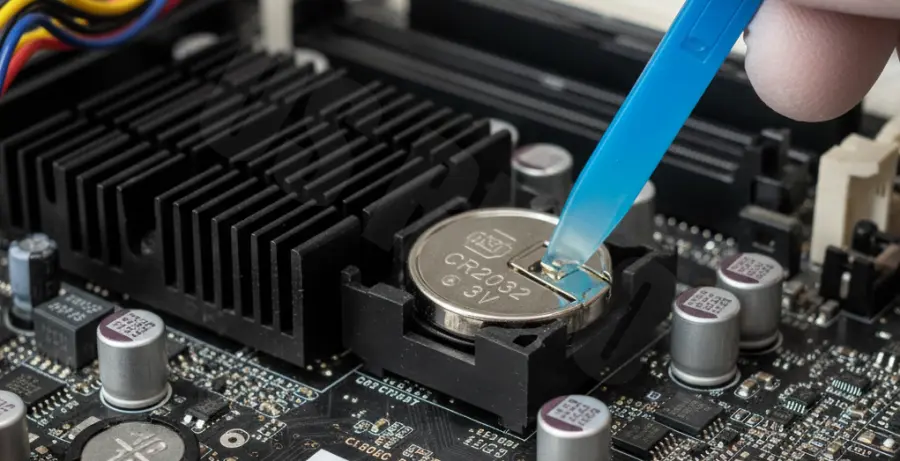
Follow the steps below to reset your motherboard settings using the CMOS battery method:
| Step | Action | Safety Note |
|---|---|---|
| 1 | Power off the PC and unplug the power cable. | Essential to prevent electrical surges. |
| 2 | Open the case and locate the CR2032 coin-cell battery. | Do not touch other motherboard components. |
| 3 | Remove the battery for 30–60 seconds. | This drains the stored capacitor energy. |
| 4 | Reinsert the battery and reboot. | The password should now be cleared. |
Technical Explanation
The BIOS password is stored in the Complementary Metal-Oxide-Semiconductor (CMOS) RAM or, in modern systems, within the EEPROM. When the password is reported as incorrect, it usually implies a synchronization error or a forgotten administrative lock.
By removing the power source (the CMOS battery), you interrupt the power flow to the CMOS chip. Since this chip requires a constant low voltage to retain data, the interruption reverts the system to factory defaults.
In some Linux-based recovery environments, technicians use specific tools to interact with CMOS data. Here is an example of how one might check hardware clock synchronization, which is often affected after a reset:
# Check the current hardware clock status
hwclock --show

# Force sync system time to hardware clock after reset
sudo hwclock --systohc
Alternative Methods
If removing the battery does not work, your motherboard may use a “Clear CMOS” jumper. This is common on high-end gaming motherboards where the battery is hidden under heat sinks or armor.
Using the Reset Jumper
Locate the pins labeled CLR_CMOS, JBAT1, or PASSWORD on your motherboard. Use a jumper cap or a flathead screwdriver to short the two pins for 10 seconds while the system is powered off.
Backdoor Master Passwords
Older BIOS versions from manufacturers like AMI, Phoenix, or Award often have hardcoded “master passwords.” These are used by technicians to bypass locks when the user-defined password fails.
Manufacturer Support Tools
Laptops from brands like Dell, HP, or Lenovo often store passwords in non-volatile memory that a battery pull cannot clear. In these cases, you must provide the “Challenge Code” displayed after three failed attempts to the manufacturer’s support team to receive a unique unlock key.